

UGE Schedule Source: Login, Schedule, App & Shift Guide
A simple guide to checking work schedules, managing shifts, requesting leave, and using ScheduleSource TeamWork

Introduction
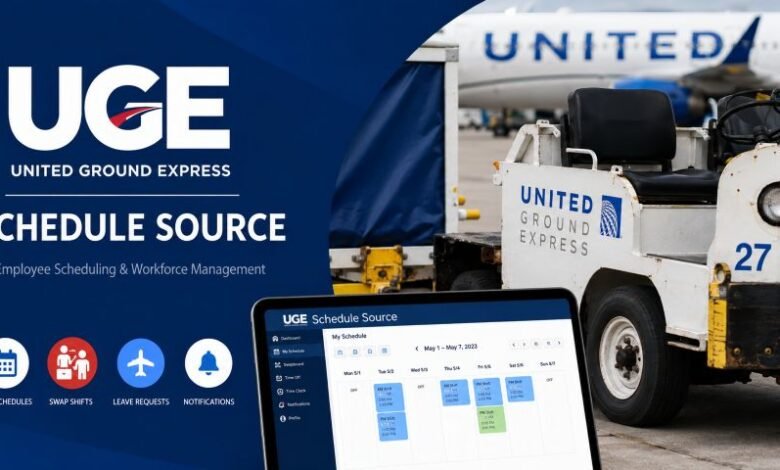
UGE Schedule Source is a phrase commonly searched by employees who want to check their work schedule, review upcoming shifts, manage time off, or access employee scheduling tools connected with United Ground Express.
UGE stands for United Ground Express, a company within the United Airlines family. United Ground Express provides airport ground-handling services at locations across the United States.
The workforce scheduling system connected with this search is ScheduleSource TeamWork. ScheduleSource describes TeamWork as a workforce management platform covering employee scheduling, shift swaps, leave management, time and attendance, notifications, and employee self-service. Its transportation solution is specifically designed for airlines and other organizations with complicated staffing needs.
This guide explains what UGE Schedule Source means, how employees can access their schedules, what they can do inside TeamWork, how the mobile app works, and what to try when login problems appear.
UGE Schedule Source Quick Facts
| Quick Fact | Details |
|---|---|
| UGE meaning | United Ground Express |
| Parent connection | Part of the United Airlines family |
| Scheduling platform | ScheduleSource TeamWork |
| Main purpose | Workforce scheduling and employee self-service |
| Schedule viewing | Available through supported employee access |
| Shift management | Includes swaps and available-shift tools |
| Leave management | Employees may view and request leave |
| Time tracking | Time and attendance tools are supported |
| Mobile access | ScheduleSource TeamWork mobile app |
| Notifications | Push, email, and other alerts may be available |
| Password reset | Available through supported sign-in systems |
| Employee permissions | Controlled by the employer |
| Airline support | TeamWork provides airline workforce-management tools |
| Mobile login | May require a TeamWork key plus employee credentials |
What Is UGE Schedule Source?
UGE Schedule Source is best understood as a search term employees use when looking for the scheduling system associated with their work.
It is important to separate the two names.
UGE means United Ground Express. The official UGE website states that United Ground Express is part of the United Airlines family and supports airport ground operations.
ScheduleSource TeamWork is the workforce management software. It can handle schedules, time and attendance, leave, shift bidding, employee self-service, reporting, notifications, and other workforce tasks.
Therefore, employees searching for “UGE Schedule Source login” are usually trying to reach their employee scheduling account rather than looking for a software product officially named “UGE Schedule Source.”
This distinction is useful because some unofficial websites describe UGE Schedule Source as a completely separate software platform. Official sources instead identify the workforce product as ScheduleSource TeamWork.
What Can Employees Do With ScheduleSource TeamWork?
The exact features visible to an employee depend on the permissions and configuration selected by the employer.
ScheduleSource states that employee access can include schedule viewing, leave management, shift swaps, trades, cancellations, notifications, and other self-service functions.
For a typical employee, this may include several everyday tasks.
Check Upcoming Work Shifts
Employees can use TeamWork to view their assigned work schedule.
The mobile application supports day, week, and month schedule views. Depending on permissions, employees may also be able to see broader shift schedules.
This makes the platform useful when checking:
- today’s working hours
- tomorrow’s shift
- weekly schedules
- upcoming assignments
- assigned work locations
- future schedule changes
ScheduleSource documentation also states that employees can see their schedule across assigned locations, including location and station information for individual shifts.
Swap or Pick Up Shifts
One useful part of TeamWork is its Swapboard.
Where the employer enables this feature, workers can post eligible shifts and look for other shifts that are available to claim. ScheduleSource says its Swapboard is designed to allow employees to manage changes in their schedules while following the organization’s scheduling rules.
An employee may therefore be able to:
- post a future shift
- find an available shift
- claim an eligible shift
- trade working times
- view the status of shift changes
Not every worker will see every option. Swapboard permissions and rules are controlled by the organization and can differ between locations.
Request Time Off
TeamWork also provides leave-management functions.
Through supported employee access, workers may be able to view current, future, and previous leave requests and submit new requests. The mobile app also supports viewing and requesting leave when the employer has enabled the required permissions.
Submitting a request does not automatically mean that leave has been approved. Employees should check the status shown in their account and follow their workplace rules.
Time and Attendance
ScheduleSource includes time-and-attendance tools alongside scheduling.
The platform can support online clocks, real-time attendance information, and payroll-related exports for employers.
The mobile application may also provide clock-in and clock-out functions when an organization has enabled them. Some employers can configure location-based clocking.
The exact method used by a UGE employee can depend on their location, job, and company configuration.
How to Access UGE Schedule Source
Employees should use the access method supplied by their employer.
ScheduleSource’s official help documentation says users should obtain their correct TeamWork URL from their Enterprise Administrator. Employees then use the appropriate portal and the account information assigned by their organization.
United also currently maintains an official sign-on route connected to ScheduleSource through its employee authentication system.
A normal access process may therefore look like this:
- Open the official employee access page provided by your employer.
- Select the correct ScheduleSource or TeamWork access option if needed.
- Enter your assigned employee credentials.
- Complete company authentication if requested.
- Open the schedule section after signing in.
- Review shifts, leave, Swapboard options, or other available tools.
Employees should avoid entering workplace credentials on unofficial websites that simply use “UGE Schedule Source” in their domain name or page title.
UGE Schedule Source Mobile App
ScheduleSource provides an official TeamWork mobile app for supported organizations.
The app is available for Apple and Android devices, although the employer must enable mobile access for employees. ScheduleSource says the application supports scheduling, leave, Swapboard functions, and notifications.
The app can make schedule management easier because employees do not always need to open the full browser-based system.
Depending on company permissions, workers may use it to:
- check schedules
- view available shifts
- post or claim shifts
- request leave
- receive schedule-change notifications
- update selected profile information
ScheduleSource’s mobile documentation notes that some functions depend directly on permissions configured by the employer.
How to Set Up the TeamWork Mobile App
The first mobile login can require more information than a normal website login.
ScheduleSource’s official instructions say users may need a one-time TeamWork key. This key is obtained through the organization’s TeamWork website. Employees then enter the key together with their code, username, and password.
The basic process is:
- Install the official ScheduleSource TeamWork application.
- Launch the app.
- Enter the one-time TeamWork key when requested.
- Enter the organization or account code.
- Add your employee username.
- Enter your password.
- Sign in.
The employee credentials are generally the same credentials used for the TeamWork website.
If you do not know the required key or company code, do not guess repeatedly. Check the official TeamWork access information supplied by your organization or contact the relevant administrator.
Why Is UGE Schedule Source Not Letting Me Log In?
Login problems can happen for several reasons.
Wrong Username or Password
First, check that the credentials were entered correctly.
ScheduleSource says the organization controls an employee’s account code and username.
If your workplace uses a company single-sign-on system, follow the credentials and authentication method provided by that system.
Wrong TeamWork Access Page
Different organizations can have different TeamWork access configurations.
ScheduleSource recommends getting the proper URL from the organization’s Enterprise Administrator instead of guessing the portal address.
Mobile Key Is Missing
If the website works but the app does not, the app may still need its TeamWork key.
ScheduleSource states that this one-time key can be found through the TeamWork website under the mobile-app information area.
Your Account Does Not Have Permission
Employee access is controlled by the organization.
If a feature is missing from the menu, that does not always mean the app is broken. Your account may simply not have permission to use that function.
Too Many Incorrect Login Attempts
Repeatedly entering incorrect credentials is not a good idea.
ScheduleSource documentation warns that excessive failed login attempts can trigger a security lockout. If an account or access point becomes locked, the Enterprise Administrator may need to help restore access.
How to Reset a ScheduleSource Password
If the normal TeamWork login page provides a Forgot Your Password option, employees may be able to reset their password without asking a manager.
ScheduleSource says the reset process normally requires the employee’s account code and username. Instructions are then sent to the email address connected with the account.
If self-service password recovery does not work, employees may need assistance from their Enterprise Administrator or the appropriate company support team.
Never send your password to another person through email, text message, or an unofficial support website.
UGE Schedule Source Notifications
Schedule changes can be easy to miss, especially in airport operations where staffing requirements can change quickly.
ScheduleSource supports several forms of workforce notifications. Its platform can provide email, SMS, and push notifications depending on the organization’s setup.
The mobile app can also notify employees about events such as schedule changes, available shifts, Swapboard activity, and leave-status updates when those functions are enabled.
Keeping notifications enabled can therefore make it easier to notice an important change before the next shift.
Is UGE Schedule Source Safe to Use?
Employees should use only the official access route supplied by United, UGE, ScheduleSource, or their authorized workplace administrator.
This matters because workforce accounts may contain private employment information.
The safest habits are simple:
- use the employer-provided login route
- check the website address before entering credentials
- never share your password
- avoid third-party “login” websites
- use official mobile apps
- sign out on shared devices
- contact workplace support when access looks unusual
United’s official employee sign-on notice also tells users not to share assigned user IDs and explains that United information systems are protected company systems.
UGE Schedule Source vs ScheduleSource TeamWork
These two phrases should not be treated as two different workforce platforms.
UGE Schedule Source is mainly a search phrase connected with employees looking for scheduling access.
ScheduleSource TeamWork is the actual product name used by ScheduleSource for its workforce management system.
That difference explains why someone may search Google for UGE Schedule Source but see ScheduleSource, TeamWork, United employee authentication, or a company-specific portal after continuing to the real service.
Frequently Asked Questions
What is UGE Schedule Source?
It generally refers to ScheduleSource TeamWork access used in connection with United Ground Express employee scheduling. UGE stands for United Ground Express, while TeamWork is ScheduleSource’s workforce management platform.
Can I check my UGE schedule from my phone?
ScheduleSource offers a TeamWork mobile app that supports schedule viewing. Mobile access must be enabled by the employee’s organization.
Can employees swap shifts?
TeamWork provides Swapboard and shift-trading functions. Whether a particular employee can use them depends on company permissions and scheduling rules.
Can I request leave through ScheduleSource?
Yes, TeamWork supports leave-management functions, and eligible employees can submit and review leave requests.
Why can’t I see the Swapboard?
Your organization may not have enabled it for your account or location. Employee privileges are controlled by the employer.
Where do I get the TeamWork mobile key?
ScheduleSource says the one-time key is available through the organization’s TeamWork website in its mobile-app information area.
What should I do if I forget my password?
Use the password-reset option available through your official sign-in page when supported. If recovery fails, contact your organization’s administrator or authorized support team.
Final Thoughts
UGE Schedule Source helps employees find the workforce tools they need for everyday scheduling tasks, but the important name to recognize is ScheduleSource TeamWork.
Employees may use the system to check upcoming work hours, review shifts, request leave, access the Swapboard, receive notifications, and manage other schedule-related tasks when those options are enabled by their employer.
For UGE workers, the safest approach is always to enter the system through the official employee access method provided by the company rather than relying on third-party login pages.
Once access is set up correctly, TeamWork can place schedules, available shifts, leave information, and important workforce updates in one convenient system.